
Authentication API — Customer Implementation Required
Example implemantation
Based on AWS Lambda, DynamoDB and API (serverless) written in JS ES modules.
Download the code.Basic Authentication for All Endpoints
All endpoints must support HTTP Basic Authentication.
This is required to ensure secure access and for PressMatrix to verify the client application's identity.
- Every API request includes an
Authorizationheader using HTTP Basic Auth. - Additionally every request includes an
Acceptheader withapplication/json. - If the basic auth credentials are missing or incorrect, your API endpoints must respond with HTTP
401 Unauthorized. - The customer (you) must provide PressMatrix with the username and password for Basic Auth during onboarding.
- In our cURL examples we use
pressmatrix:"we'rereallysecure!"as Basic Auth credentials.
Flowchart Overview of Authentication API
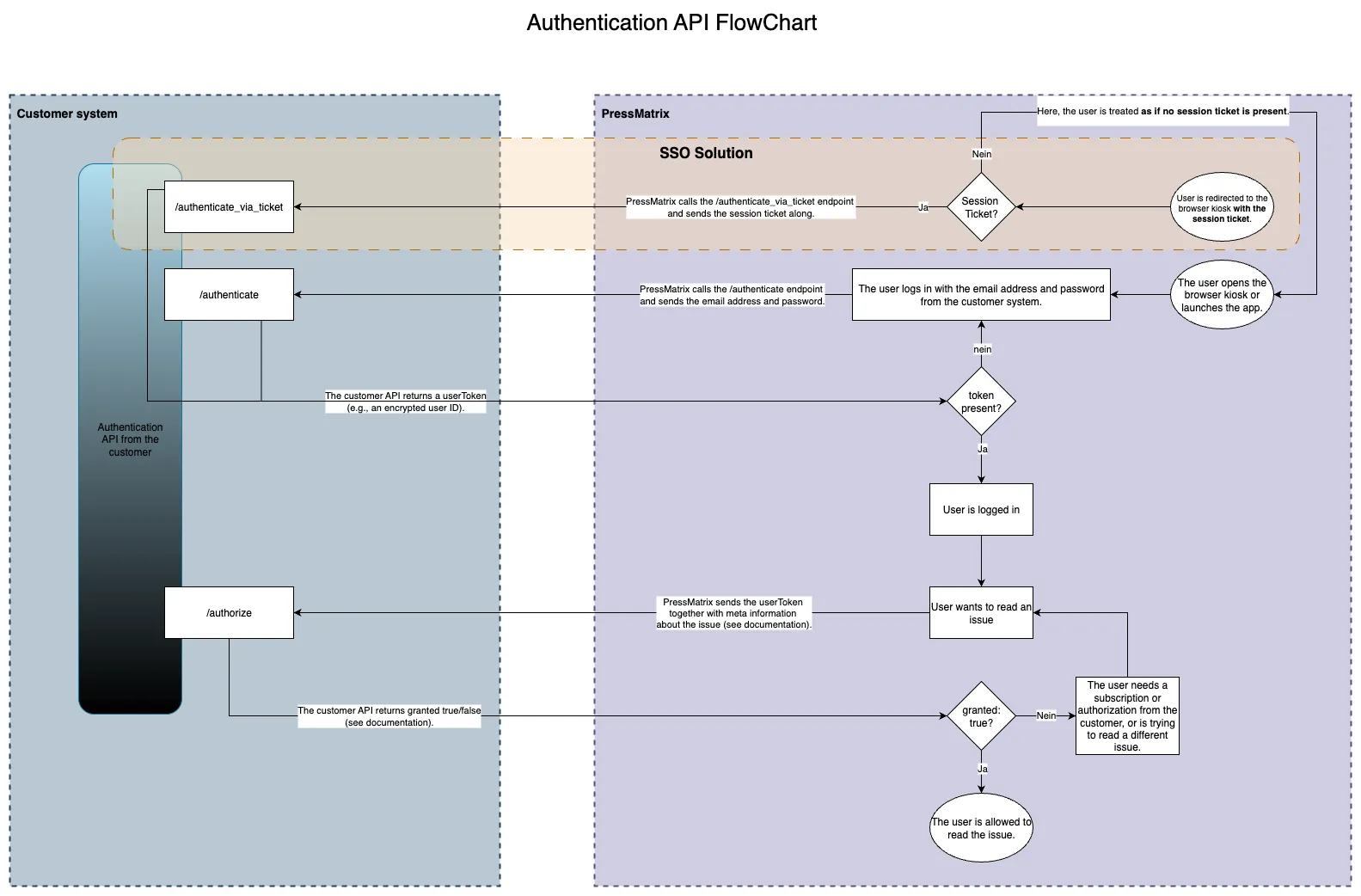
Flowchart of Authentication API. The /authenticate flow represents all other authorize endpoints.
Authentication
Authenticates a subscriber by their username and password.
Workflow
-
The client app or browser sends the user's login credentials (username and password) to the customer's authentication backend.
-
The authentication backend checks if the credentials are valid. If valid, it returns a token. If not, it returns an empty string.
-
PressMatrix stores this token and includes it with all subsequent API calls made by the user.
This token acts as the persistent user ID and must not change over time.
Parameters
- Name
profile_token- Type
- string
- Description
The unique profile token for the customer's publication
Request Body
- Name
username- Type
- string
- Description
Username (or email) of the subscriber
- Name
password- Type
- string
- Description
Password of the subscriber
Response Schema
- Name
token- Type
- string
- Description
Non-expiring authentication token. Empty if login failed.
Pattern:
^[A-Za-z0-9]+$
Request
curl -X POST https://{auth-server-url}/pmx-api/v1/{profile_token}/authenticate \
  -u pressmatrix:"we'rereallysecure!"
  -H "Content-Type: application/json" \
  -H "Accept: application/json" \
  -d '{
    "username": "user@example.com",
    "password": "secretpassword"
  }'
Success Response
{
  "token": "eyJhbGciOiJIUzI1NiIsInR5cCI6IkpXVCJ9..."
}
Failure Response
{
  "token": ""
}
Authentication via Ticket
Allows PressMatrix to take over an existing user session from an external website using a temporary session ticket. This is typically used for Single Sign-On (SSO) in browser kiosks.
Workflow
-
The user logs in on the publisher's website (i.e. the customer's authentication system).
-
The customer's system generates a one-time
session_ticket. This ticket:- must not contain dots
- must not exceed 256 characters
-
The user is redirected to a PressMatrix Webhook URL:
https://your-browser-kiosk-domain/de/profiles/{{profile_token}}/users/ticket/{{session_ticket}} -
The Webhook triggers a backend call from PressMatrix to:
POST {auth-server-url}/pmx-api/v1/{profile_token}/authenticate_via_ticket -
The authentication server validates the ticket and returns a token if valid — or an empty string if invalid.
This method offers a simplified alternative to the
/authenticateendpoint and allows automatic login flows without entering credentials again. It is limited to browser-based scenarios.
Parameters
- Name
profile_token- Type
- string
- Description
The unique profile token for the customer's publication
Request Body
- Name
ticket- Type
- string
- Description
Temporary session ticket (must match the ticket passed in the Webhook URL) Pattern:
^[A-Za-z0-9]+$
Response Schema
- Name
token- Type
- string
- Description
The non-expiring authentication token to be used for future API requests. If the ticket is invalid or unknown, an empty string is returned.
Request
curl -X POST https://{auth-server-url}/pmx-api/v1/{profile_token}/authenticate_via_ticket \
  -u pressmatrix:"we'rereallysecure!"
  -H "Content-Type: application/json" \
  -H "Accept: application/json" \
  -d '{
    "ticket": "skF5N8MKcWY39L8Gnlnh4x6OO5KPdLkr9L7XBRMp"
  }'
Success Response
{
  "token": "cbe45f4c-8a6d-4029-b74c-8c3182faa2bc"
}
Failure Response
{
  "token": ""
}
Authorization (Issues)
Checks if an authenticated user has access to a specific content item.
Workflow
- The customer defines product, issue, and category information for each publication item inside the PressMatrix Workbench.
- When a user requests access to an item, PressMatrix sends these details along with the user’s token to the customer's
/authorizeendpoint. - The customer's backend must evaluate the request and respond with either
granted: trueorgranted: false.
The customer is responsible for implementing this endpoint and may define any internal rules or mappings, but the decision must be based only on the fields provided in the request.
Parameters
- Name
profile_token- Type
- string
- Description
The unique profile token for the customer's publication
Request Body
- Name
token- Type
- string
- Description
The persistent user token obtained via
/authenticateor/authenticate_via_ticket
- Name
issue_name- Type
- string
- Description
Display name of the issue to access
- Name
issue_date- Type
- string
- Description
Publication date of the issue (format:
YYYY-MM-DD)
- Name
category_name- Type
- string
- Description
Display name of the category the issue belongs to
- Name
category_ids- Type
- string
- Description
Comma-separated list of all category IDs
- Name
product_id_apple- Type
- string
- Description
Apple product ID
- Name
product_id_google- Type
- string
- Description
Google product ID
- Name
product_id_amazon- Type
- string
- Description
Amazon product ID
- Name
product_id_external- Type
- string
- Description
External (custom) product ID
Response Schema
- Name
granted- Type
- boolean
- Description
Whether access is granted (
true) or denied (false).
Request
curl -X POST https://{auth-server-url}/pmx-api/v1/{profile_token}/authorize \
  -u pressmatrix:"we'rereallysecure!"
  -H "Content-Type: application/json" \
  -H "Accept: application/json" \
  -d '{
    "token": "user_token",
    "issue_name": "Sample Issue May 2014",
    "issue_date": "2014-05-01",
    "category_name": "Sample Category",
    "category_ids": "20924,20925",
    "product_id_apple": "sample_issue_2014_05",
    "product_id_google": "sample_issue_2014_05",
    "product_id_amazon": "sample_issue_2014_05",
    "product_id_external": "sample_id_1,sample_id_2"
  }'
Access Granted
{
  "granted": true
}
Access Denied
{
  "granted": false
}
(Optional) Authorization (Download)
Checks if an authenticated user has access to a specific download.
Workflow
...tbd...
Parameters
- Name
profile_token- Type
- string
- Description
The unique profile token for the customer's publication
Request Body
- Name
token- Type
- string
- Description
The persistent user token obtained via
/authenticateor/authenticate_via_ticket
- Name
name- Type
- string
- Description
Display name of the download to access
- Name
date- Type
- string
- Description
Publication date of the issue (format:
YYYY-MM-DD)
- Name
category_name- Type
- string
- Description
Display name of the category the issue belongs to
- Name
category_ids- Type
- string
- Description
Comma-separated list of all category IDs
- Name
product_id_external- Type
- string
- Description
External (custom) product ID
Response Schema
- Name
granted- Type
- boolean
- Description
Whether access is granted (
true) or denied (false).
Request
curl -X POST https://{auth-server-url}/pmx-api/v1/{profile_token}/authorize_download \
  -u pressmatrix:"we'rereallysecure!"
  -H "Content-Type: application/json" \
  -H "Accept: application/json" \
  -d '{
    "token": "user_token",
    "name": "Sample Issue May 2014",
    "date": "2014-05-01",
    "category_name": "Sample Category",
    "category_ids": "20924,20925",
    "product_id_external": "sample_id_1,sample_id_2"
  }'
Access Granted
{
  "granted": true
}
Access Denied
{
  "granted": false
}
(Optional) Authorization (ChatBot)
Checks if an authenticated user has access to the chatbot.
Workflow
...tbd...
Parameters
- Name
profile_token- Type
- string
- Description
The unique profile token for the customer's publication
Request Body
- Name
token- Type
- string
- Description
The persistent user token obtained via
/authenticateor/authenticate_via_ticket
- Name
name- Type
- string
- Description
Display name of the chatbot
- Name
uuid- Type
- string
- Description
Chatbot UUID (unique identifier for the chatbot instance)
- Name
product_id_external- Type
- string
- Description
External (custom) product ID
Response Schema
- Name
granted- Type
- boolean
- Description
Whether access is granted (
true) or denied (false).
Request
curl -X POST https://{auth-server-url}/pmx-api/v1/{profile_token}/authorize_chatbot \
-u pressmatrix:"we'rereallysecure!" \
-H "Content-Type: application/json" \
-H "Accept: application/json" \
-d '{
  "token": "ff78bf90826c4f48ce3e",
  "name": "Chatty",
  "uuid": "4ea94fb1-7d9d-4e6d-ab57-90d7e7b31b2e",
  "product_id_external": "com.pressmatrix.staging.chatbot.001"
}'
Access Granted
{
  "granted": true
}
Access Denied
{
  "granted": false
}
(Optional) Authorization (Article)
Checks if an authenticated user has access to a specific content item.
Workflow
...tbd...
Parameters
- Name
profile_token- Type
- string
- Description
The unique profile token for the customer's publication
Request Body
- Name
token- Type
- string
- Description
The persistent user token obtained via
/authenticateor/authenticate_via_ticket
- Name
name- Type
- string
- Description
Display name of the article to access
- Name
date- Type
- string
- Description
Publication date of the article (format:
YYYY-MM-DD)
- Name
category_name- Type
- string
- Description
Display name of the category the issue belongs to
- Name
category_ids- Type
- string
- Description
Comma-separated list of all category IDs
- Name
product_id_apple- Type
- string
- Description
Apple product ID
- Name
product_id_google- Type
- string
- Description
Google product ID
- Name
product_id_amazon- Type
- string
- Description
Amazon product ID
- Name
product_id_external- Type
- string
- Description
External (custom) product ID
Response Schema
- Name
granted- Type
- boolean
- Description
Whether access is granted (
true) or denied (false).
Request
curl -X POST https://{auth-server-url}/pmx-api/v1/{profile_token}/authorize_article \
  -u pressmatrix:"we'rereallysecure!"
  -H "Content-Type: application/json" \
  -H "Accept: application/json" \
  -d '{
    "token": "user_token",
    "name": "Article name",
    "date": "2014-05-01",
    "category_name": "Sample Category",
    "category_ids": "20924,20925",
    "product_id_apple": "sample_issue_2014_05",
    "product_id_google": "sample_issue_2014_05",
    "product_id_amazon": "sample_issue_2014_05",
    "product_id_external": "sample_id_1,sample_id_2"
  }'
Access Granted
{
  "granted": true
}
Access Denied
{
  "granted": false
}
(Optional) Issues
This feature is optional and must be explicitly enabled by PressMatrix. When enabled, users can see all issues (magazines) they are entitled to access based on the product IDs configured in the PressMatrix Workbench.
Returns a list of product IDs corresponding to all issues the authenticated user is allowed to access.
Each returned product ID must match one of the configured identifiers:
product_id_appleproduct_id_googleproduct_id_amazon(deprecated)product_id_external
The customer can return mixed product ID types. PressMatrix automatically maps these IDs to the correct issues.
Workflow
- PressMatrix sends the user's persistent token to the customer's
/issuesendpoint. - The customer's backend checks which issues the user owns.
- The endpoint returns a flat array of product IDs.
Rules
- Order does not matter.
- Duplicates must not be returned.
- At least one supported product ID per issue must be returned for it to be visible.
Parameters
- Name
profile_token- Type
- string
- Description
The unique profile token for the customer's publication
Request Body
- Name
token- Type
- string
- Description
The persistent user token obtained via
/authenticateor/authenticate_via_ticket
Response Schema
- Name
issues- Type
- array
- Description
Array of product IDs representing the user's accessible issues
Request
curl -X POST https://{auth-server-url}/pmx-api/v1/{profile_token}/issues \
  -u pressmatrix:"we'rereallysecure!" \
  -H "Content-Type: application/json" \
  -H "Accept: application/json" \
  -d '{
    "token": "user_token_12345"
  }'
Sample Response (Mixed IDs)
{
  "issues": [
    "sample_issue_2024_01",            // external product ID
    "com.publisher.issue202402",       // apple product ID
    "com.publisher.issues.202403"       // google product ID
  ]
}
Sample Response (Empty)
{
  "issues": []
}